ogmini - Exploration of DFIR
Having fun while diving into the world of DFIR / 4n6.
About Blog Posts by Tags Research Talks/Presentations GitHub Search RSS
Steam Frame - Account and Network Info
by ogmini
How can you tell what account(s) are logged into a Steam Frame or Wi-Fi networks have been configured?
[!WARNING]
The research below is ongoing and very much stream of consciousness. At times, I will be theorizing and making jumps to a conclusion. As with any theory, these may prove to be WRONG. Do your own testing/verification. When I am ready and comfortable, I will publish my findings in a more rigorous manner.
I’m going to keep a running list of interesting files:
| Filename | Location | Notes | Post |
|---|---|---|---|
| chaperone_info.vrchap | /home/steamos/.config/openvr/config/ | Stores information about the chaperone/playspace/boundaries | https://ogmini.github.io/2026/09/30/Steam-Frame-Chaperone.html |
| registry.vdf | /home/steamos/.steam/ | Steam Registry Key | |
| *.nmconnection | /etc/NetworkManager/system-connections/ | NetworkManager Connections |
Account
One place we can find the auto logged in user for the Steam Frame is in a local registry file. Location and name of the file is detailed above. We can find some published information about this file and its format at https://github.com/l3laze/Steam-Data/blob/master/steam_data.txt.
Below is a screenshot of the registry.vdf on my Steam Frame with my user account redacted out and so far what we have lines up with the published information.
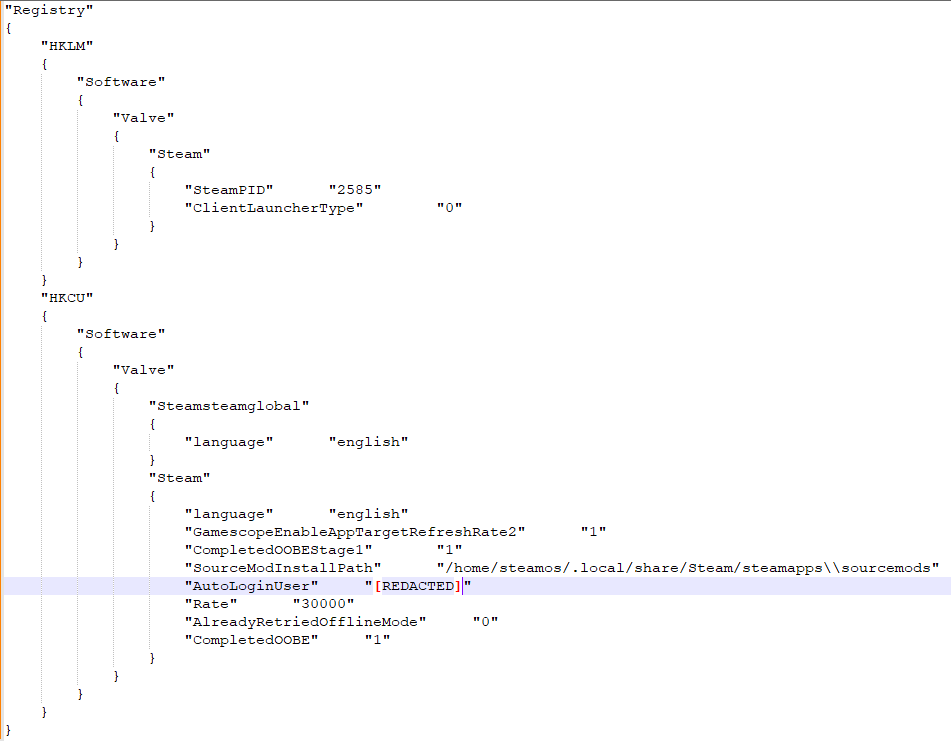
There is also a corresponding older .tmp file.
Network Manager
sudo ls /etc/NetworkManager/system-connections
The above gives us a list of NetworkManager connection profiles for the Steam Frame. Examining those files gives us information about configured Wi-Fi networks. This is a pretty standard DFIR artifact for Linux machines.
Open Questions
- What happens if we change accounts on the Frame?
- Is account information stored anywhere else?
- Can anything be extrapolated from the .tmp file’s timestamps?
References
- https://github.com/ValveSoftware/steam-for-linux
- https://github.com/l3laze/Steam-Data/blob/master/steam_data.txt